MEANスタック入門(4) AngularとExpressの連携
今回はExpressで作成したAPIをAngularから実際に利用しつつ、Angularの基本的な開発方法に触れていきます。
project-name/src/app配下で作業し、作業後の構成は以下のようになります。
app
│  app-routing.module.ts
│  app.component.html
│  app.component.scss
│  app.component.spec.ts
│  app.component.ts
│  app.module.ts
│
├─components
│  └─call-express-api
│          call-express-api.component.html
│          call-express-api.component.scss
│          call-express-api.component.spec.ts
│          call-express-api.component.ts
│
└─services
        call-express-api.service.spec.ts
        call-express-api.service.ts
Serviceの作成
Angularでは、各種APIへのアクセスはServiceから行います。
servicesディレクトリを作成し、Angular CLIのng g serviceコマンドで必要ファイルを生成します。
ng g serviceコマンドはカレントディレクトリに依存するので、servicesディレクトリまで移動してから実行します。
$ ng g service callExpressApi
実行すると以下の2ファイルが生成されます。
specのほうはテスト用なので、call-express-api.service.tsのほうにAPIにアクセスするgetUsersメソッドを実装します。
まず、HTTPアクセスに必要なHttpクラスをインポートしてコンストラクタの引数に指定します。
また、Http.getはObservable型の値を返すので、Observable.mapを使うためにrxjs/add/operator/mapをインポートします。
call-express-api.service.ts
import { Injectable } from '@angular/core';
import { Http } from '@angular/http';
import 'rxjs/add/operator/map';

@Injectable()
export class CallExpressApiService {

  constructor(
    private http: Http
  ) { }

  getUsers() {
    return this.http.get("api/users")
            .map(response => response.json());
  }
}
上記ではapi/usersにアクセスしていますが、ng serverで実行している場合、Angularの簡易サーバとAPIサーバが別のポートで動いているので、Angular側からAPIを呼ぶと404のエラーになります。
また、ポートまで指定してAPIにアクセスした場合も、クロスオリジンのエラーで同じく実行出来ません。
これを回避するには、プロジェクトのルートディレクトリにproxy.conf.jsonを作成し、ng server実行時に--proxy-configオプションで読み込ませます。
proxy.conf.json
{
  "/api": {
    "target": "http://localhost:4300",
    "secure": false
  }
}
$ ng server --proxy-config proxy.conf.json
これでポートの差異を意識せず開発出来るようになります。
Componentの作成
Componentはビューの部品のようなもので、各部品毎の表示や動作を定義します。
componentsディレクトリを作成し、Angular CLIのng g componentコマンドで必要ファイルを生成します。
ng g componentコマンドはng g serviceと同じくカレントディレクトリに依存するので、componentsディレクトリまで移動してから実行します。
$ ng g component callExpressApi
実行するとcall-express-apiディレクトリが生成され、その配下に以下4ファイルが生成されます。
- call-express-api.component.html
- call-express-api.component.scss
- call-express-api.component.ts
- call-express-api.component.spec.ts
call-express-api.component.ts
CallExpressApiComponentクラスを作成し、先ほど作成したCallExpressApiServiceを実行して、HTML表示用の変数に代入します。
CallExpressApiServiceをインポートしてコンストラクタの引数に指定し、Serviceのインスタンスを生成するためにprovidersで読み込みます。これは、app.module.tsでグローバルに読み込んでも動きますが、今回はこのComponentだけなのでここで読み込みます。
getUsersはObservableを返すので、subscribeメソッドでデータを受け取って変数usersに代入します。
call-express-api.component.ts
import { Component, OnInit } from '@angular/core';
import { CallExpressApiService } from '../../services/call-express-api.service';

@Component({
  selector: 'app-call-express-api',
  templateUrl: './call-express-api.component.html',
  styleUrls: ['./call-express-api.component.scss'],
  providers: [CallExpressApiService]
})
export class CallExpressApiComponent implements OnInit {

  users: any;

  constructor(
    private callExpressApiService: CallExpressApiService
  ) { }

  ngOnInit() {
    this.callExpressApiService.getUsers().subscribe(u => {
      this.users = u.users;
    });
  }
}
call-express-api.component.html
APIからの返答が代入された変数usersを利用して、内容を表示するHTMLを作成します。
配列を受けて要素の数だけ繰り返し表示させる場合、ngForディレクティブを利用します。*プレフィックスを付与することでtr要素がテンプレート化され、そのテンプレートを元にusersの各要素の内容が表示されます。
call-express-api.component.html
<table border="1">
  <tr *ngFor="let user of users">
    <td>{{user.id}}</td>
    <td>{{user.address}}</td>
  </tr>
</table>
ルーティングの設定
初めに表示されるComponentはapp直下にあるapp.component.htmlです。
ここにナビゲーションを用意し、ナビゲーションをクリックするとヘッダーを残してコンテンツ部分が切り替わるような、いわゆるシングルページアプリケーションの構成にします。
routerLinkディレクティブでURIを指定し、<router-outlet>タグでコンテンツ表示位置を設定します。
app.component.html
<header>
  <h1 class="logo"><a href="/">MEAN</a></h1>
  <nav>
    <ul>
      <li><a routerLink="/users">Users</a></li>
    </ul>
  </nav>
</header>
<router-outlet></router-outlet>
Angularアプリをng newで初めに生成する際、--routing=trueを付けているとapp直下にapp-routing.module.tsが生成され、app.module.tsで既に読み込まれています。
このapp-routing.module.tsに、ルーティングさせたいURIとComponentを記述します。
app-routing.module.ts
import { NgModule } from '@angular/core';
import { Routes, RouterModule } from '@angular/router';

import { CallExpressApiComponent } from './components/call-express-api/call-express-api.component';

const routes: Routes = [
  {path: 'users', component: CallExpressApiComponent},
];

@NgModule({
  imports: [RouterModule.forRoot(routes)],
  exports: [RouterModule]
})
export class AppRoutingModule { }
動作確認
ng serverで実行している場合のAngular側のテストは、http://localhost:4200にアクセスします。
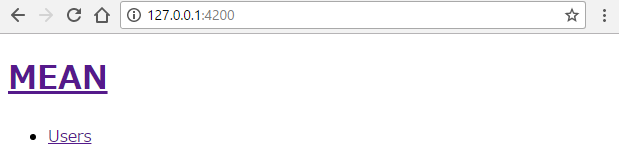
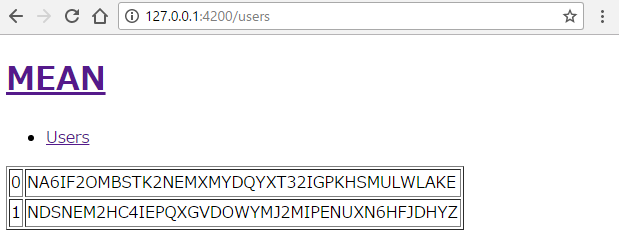
Usersのリンクをクリックすると、APIのレスポンスを受けてテーブルが表示されます。
ビルド後はdistディレクトリのclient配下のファイルも揃うので、dist/server/bin/www.jsを実行するだけでhttp://localhost:4300からclient配下のファイルも提供されます。
